Recorder: A Personal Audio Studio for Clearer Speech and Compact MP4 Exports
Quick Answer
Record voice notes, music, or ambient sound directly in your browser. Reduce steady fan noise and electrical hum without damaging the speaker’s natural voice, trim the ends non-destructively, and export a genuine compact MP4 file.
Key Terms
- Spectral noise reduction
- LUFS loudness
- Non-destructive editing
- OPFS
- ISO BMFF MP4
- AAC
Most everyday recordings happen in imperfect rooms: a ceiling fan spinning overhead, a laptop charger humming at 50 Hz, a speaker leaning back for a quiet aside, and a few seconds of shuffling before and after the actual thought. Open Recorder (/tools/recorder) is a personal, local-first audio recorder and sound-cleaning studio built to make that ordinary task effortless while keeping your original capture safe on your own device.
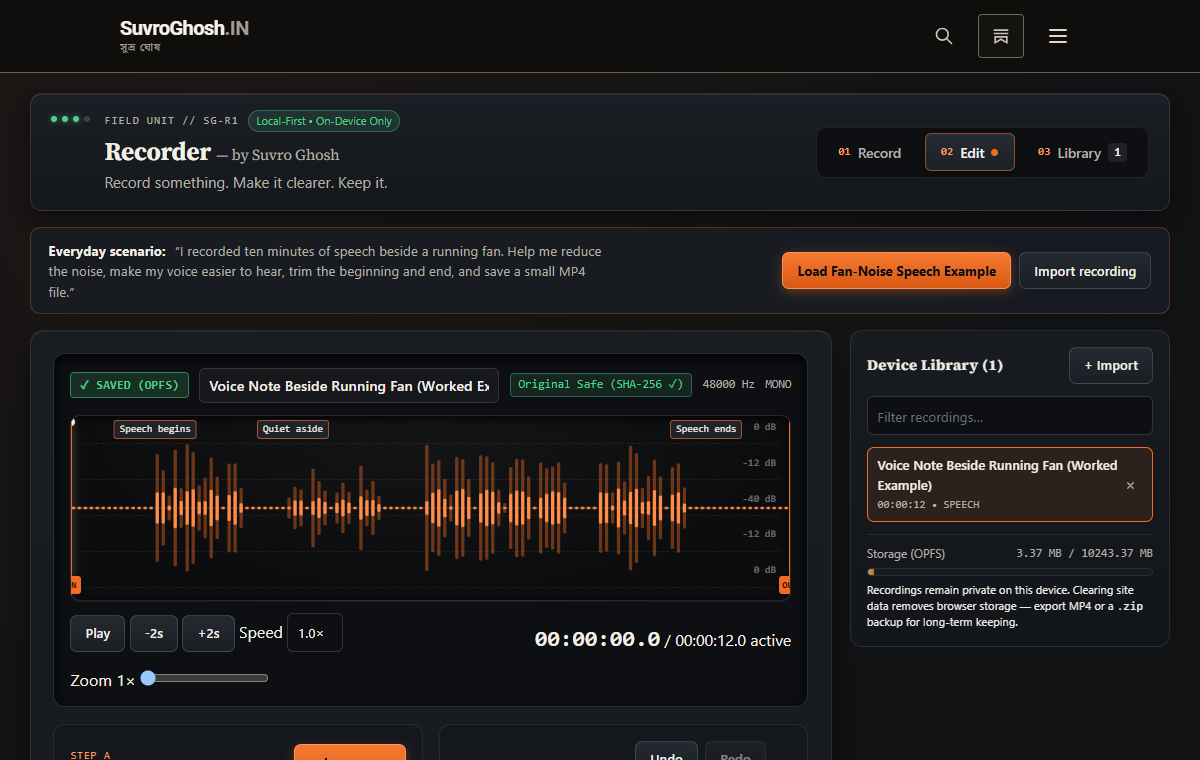
A Worked Example: Ten Minutes of Speech Beside a Running Fan
Consider the everyday task that shaped the interface:
“I recorded ten minutes of speech beside a running fan. Help me reduce the noise, make my voice easier to hear, trim the beginning and end, and save a small MP4 file.”
Inside Recorder, the workflow follows four direct steps (Record → Improve sound → Trim → Export):
- Record reliably (or load the built-in fan-noise example): Audio chunks are committed incrementally to browser storage (
OPFSandIndexedDB) with a SHA-256 integrity digest before the recording is ever marked Saved. If a tab closes unexpectedly, Recorder offers recovery up to the last verified chunk boundary. - Improve sound while keeping the original untouched: Clicking Improve sound analyses the recording first—measuring the steady noise floor, sub-80 Hz desk/fan rumble, 50/60 Hz electrical hum harmonics, sibilance ratio, and K-weighted loudness (
LUFS). A conservative chain of high-pass filtering, harmonic hum notches, decision-directed spectral noise suppression (plus an optional 144 KB localBark-GRUneural speech mask), gentle vocal presence shaping (+2.5 kHz,-250 Hzmud cut), split-band de-essing, noise-gated dynamic leveling, and-1.0 dBFSbrickwall peak limiting makes quiet remarks clear without stripping the speaker’s accent or timbre. You can toggle Hear original and Hear improved at matched loudness at any point. - Trim non-destructively: Drag the orange
INandOUTtrim handles on the waveform—or type exact timestamps—to remove the leading and trailing fan noise, preview and shorten long pauses explicitly, or add short fades. Every edit is stored as a non-destructive recipe; Reset restores the bit-verified original immediately. - Export a small, genuine MP4: Choose MP4 Audio (
.mp4), M4A Audio (.m4a), or MP4 Video with Title Card (.mp4) for social platforms. At the default Standard Speech (96 kbps monoAAC) preset, a ten-minute spoken note exports to roughly 7.2 MB—or 4.8 MB at64 kbps mono—verified as a genuine ISO Base Media File Format (ftyp/moov/mdat) container rather than a renamed WebM stream.
Checking article narration…
Published · Updated
Word Cloud
Related reading
Selected by shared topics and section, with closer publication dates breaking ties.
Comments
Read the conversation or leave a thought for review. Comments load when this section is in view.