Reality,
with a twist.
A straight line. A familiar face. A little change in geometry. Turn a dial and see how an image bends.
Explore the optics below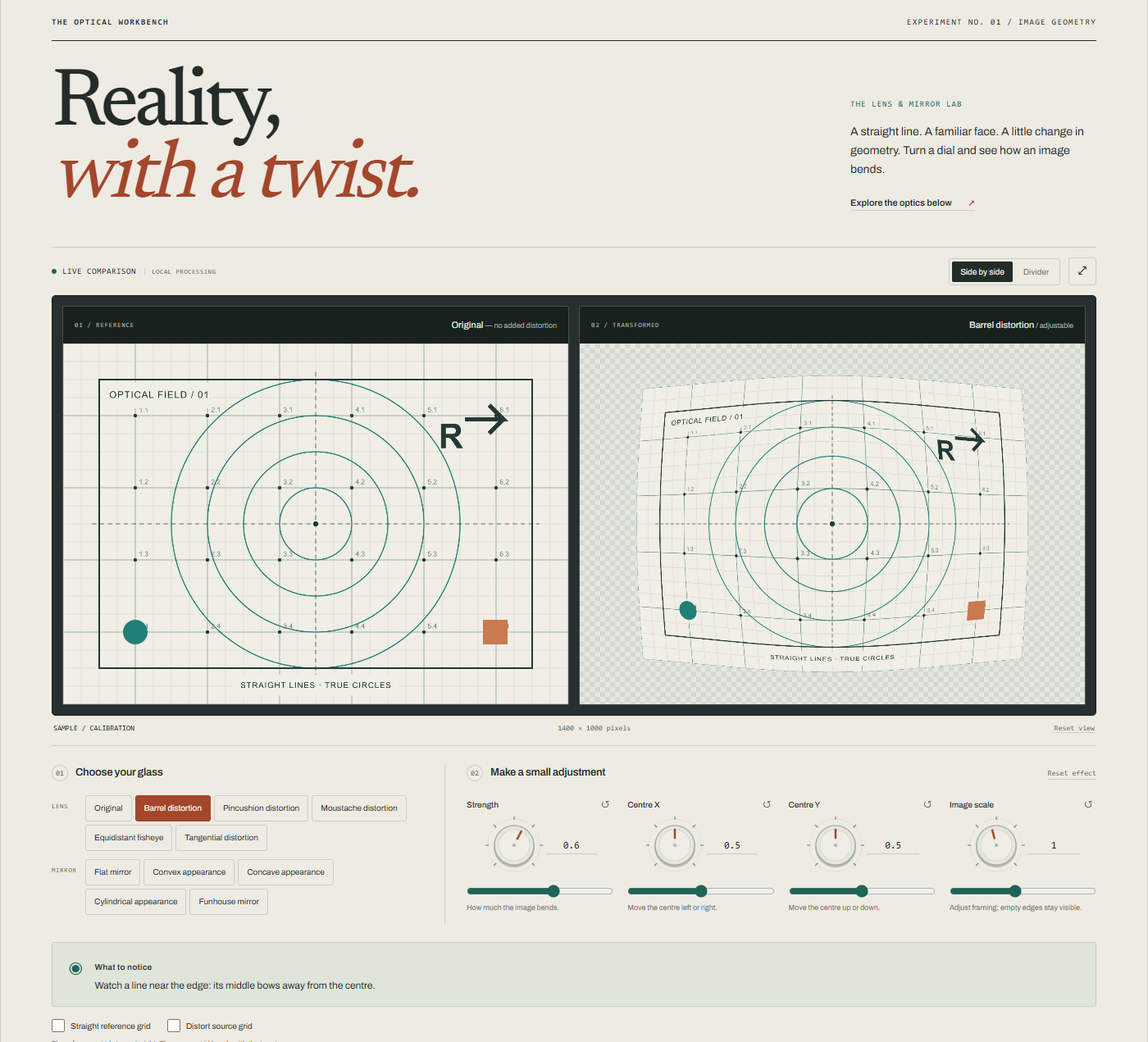
Preparing your optical workbench…
Checking article narration…
A straight line takes a bend
A window frame is a useful witness. Its vertical edge gives your eye something definite to follow. Turn a control and the edge bows; turn it the other way and the bend changes direction. The building is still recognisable, but its geometry has acquired a different rule.
This lab puts that change beside its source. Choose a lens effect, a mirror appearance or one of the supplied images, then adjust a control. The reference pane always means original — no added distortion. That wording matters: a photograph may already include lens distortion, perspective and earlier editing.
Start with the calibration chart. Its straight lines, circles, numbers and asymmetric letter give you several ways to inspect the same transformation. A face makes stretching immediately familiar. A chart makes it easier to say exactly where it happened.
The edges tell the story
In the barrel preset, lines away from the centre bow outward. Pincushion bends them the other way. The most revealing lines are often near the boundary, where a small change in geometry has more room to accumulate. A line passing through the distortion centre can remain straight while neighbouring ones curve.
Moustache distortion introduces a change of curvature across the field. Look beyond the very centre and then towards the edge: one description such as “bulging” no longer tells the whole story. The tangential preset breaks the simple radial symmetry and makes the distortion more uneven.
The simple lens presets use bounded coordinate warps rather than an attempt to identify your camera. The Advanced panel adds a radial and tangential coefficient model, replacing the simple preset strength when enabled. OpenCV’s camera-calibration tutorial describes these coefficients and how a calibration process estimates them. Here you choose parameters to explore their visible consequences; they are not measured properties of your photograph.
Perspective already has a place in the picture
Switch to the corridor. The floor lines meet towards the distance before you add an effect. That convergence belongs to the illustrated perspective. Straight lines can converge without becoming curved.
Now apply barrel distortion. Follow one floor seam from the foreground towards the doorway. You are comparing a transformation of the existing picture with the picture’s original geometry. You are not moving the viewpoint through a three-dimensional corridor.
This is also why the façade and typography samples are useful. Their repeated lines supply a quieter baseline. Return to the chart whenever a complex image makes it hard to distinguish the source from the added effect.
Fisheye is a projection choice
A fisheye appearance is more than a large local bulge. This lab uses an equidistant-style angular projection, blended with the source mapping by the strength control. Its geometric rule differs from the other radial presets.
The OpenCV fisheye model expresses projection through the angle of an incoming direction. That distinction also explains why simply setting a fisheye model’s extra coefficients to zero does not necessarily restore a rectilinear image. The lab’s Original state explicitly restores the source mapping.
Try the corridor and watch its outer features gather differently. No new scenery appears. The renderer has only the source pixels; it cannot supply a doorway, tree or person outside the original frame. Empty areas indicate that the transformation asks for image content beyond those available pixels.
What a mirror appearance can show
Choose Flat mirror and inspect the lettering. The horizontal image flip is deliberate and visible. It is a simple way to compare the handedness of this picture, rather than a model of every spatial relationship in a real mirror scene.
The convex and concave appearances compress or magnify regions of the image. Cylindrical appearance concentrates the warp along one axis. Funhouse introduces smooth waves of stretching and compression. Try a small amount first: the same effect often becomes easier to understand before it becomes spectacular.
These curved-mirror modes are 2D approximations. Real mirror images depend on surface shape and the positions of objects and observer. A concave mirror can form different kinds of image as object distance changes; a fixed photograph warp cannot represent all of them. OpenStax’s treatment of spherical mirrors explains those relationships with rays and image formation.
Five small experiments
1. Bend the grid both ways
Use Calibration, select Barrel and slowly increase strength. Follow one outer vertical line. Switch to Pincushion and compare its direction of curvature. Reduce strength again and notice how much easier it is to detect the difference with the original beside it.
2. Move the centre
Keep the grid and place the distortion centre away from the middle, using the image interaction or centre controls. Watch which lines now seem most stable. The reference stays still, giving you an anchor while the pattern’s symmetry shifts.
3. Meet the same face twice
Choose the illustrated portrait, then compare the convex and concave appearances at moderate strength. Follow the spacing of the eyes, the width of the cheeks and the outline of the head. Change the centre and see how quickly a different feature becomes dominant. This is a drawing created for the lab, so the experiment needs no personal photograph.
4. Read the reflection
Choose Typography and Flat mirror. Inspect the arrow and the letters R and F. Symmetric marks can conceal a reversal; these shapes make it obvious. Then try a cylindrical appearance and compare a one-axis warp with the earlier two-axis effects.
5. Bring your own image
Load a JPEG, PNG or static WebP within the displayed limits. A room, bookshelf or building is a good first choice. Begin with a mild effect, keep the original visible and alter one parameter at a time. If a strong setting becomes confusing, reset the effect and make a smaller change.
A shader asks where to look
Think of the output as a sheet of little windows. For each output pixel, the renderer asks: which position in the source should supply this colour? A shader performs that lookup many times in parallel.
Changing the lookup coordinates changes where features appear. Sampling farther apart can compress a region of the source into less output space. Sampling closer together can spread a source region across more of the result. The image is being rearranged, not understood as objects.
A forward mapping describes where a source point would land. Drawing usually needs the opposite question: where should this output point look back into the source? Keeping those directions distinct is essential when naming and checking the presets. The calibration chart is part of that check, rather than decoration around the controls.
The reference grid and source grid serve different purposes too. A source grid bends with the image. A reference grid stays straight over the output, providing something steady against which to compare the result.
Your picture stays with you
Personal images are processed locally in the browser. The input limit is 10 MB, with a separate 20-megapixel limit and an 8192-pixel limit on either dimension. Those limits bound different things: a compact file can still describe a very large decoded image.
The app prepares a working preview with a maximum long edge of 2048 pixels, reduced further if the device requires it. The two panes share that prepared source. A download reflects the working result at its stated dimensions, rather than promising an untouched full-resolution photograph.
A shared preset link carries the effect settings and, for a built-in example, its sample choice. It does not contain a personal image. Someone opening settings made with your upload needs to choose an image themselves.
Turn the controls slowly. Follow a line, a letter or one familiar feature. The small comparison is the point: the same source can support many appearances, and a steady reference helps you see the rule behind each one.
Quick reference and FAQ
Choose an image, turn a control and watch its geometry change beside the original. The lens modes explore image-coordinate models; the curved-mirror modes are clearly labelled two-dimensional appearances. Personal images stay in your browser.
Key Terms
- Radial distortion
- Tangential distortion
- Fisheye projection
- Image reflection
- Inverse sampling
Frequently asked questions
Does this lab upload my photograph?
No. The lab processes your selected image in your browser. It accepts JPEG, PNG and static WebP up to 10 MB and 20 megapixels, with a maximum dimension of 8192 pixels, and prepares a smaller working preview.
Is the original image guaranteed to be free of distortion?
No. Original means no distortion added by this lab. A photograph may already contain lens distortion, perspective effects or editing. The lab does not calibrate the camera or automatically correct the source.
Are the curved-mirror effects physically complete simulations?
No. They are labelled two-dimensional image approximations. A physical mirror's image depends on the mirror, scene geometry and viewing position, which an ordinary photograph does not fully describe.
Can the fisheye mode reveal more of my scene?
No. It remaps the pixels already present in the source image. It cannot recover objects or scenery outside the photograph.
Word Cloud
Related reading
Selected by shared topics and section, with closer publication dates breaking ties.
Comments
Read the conversation or leave a thought for review. Comments load when this section is in view.